
Chloe Maraina brings a unique perspective to the world of audiovisual technology, blending her deep expertise in big data and business intelligence with a passion for human-centric design. As the hybrid work model becomes the standard for global organizations, Chloe focuses on how data-driven insights and artificial intelligence can transform cold, static meeting rooms into dynamic environments for collaboration. Her vision is clear: technology should not be a hurdle to overcome, but a seamless bridge that connects people across continents with the same intimacy as a face-to-face conversation.
In this discussion, we explore the technical strategies required to solve the persistent issue of “distance bias” and the critical role of precision audio in maintaining meeting focus. We delve into the shift toward non-traditional furniture layouts like D-shaped tables and the importance of dedicated gallery screens in huddle spaces to ensure remote participants are never ignored. Finally, we address the logistical challenges of platform interoperability and the metrics that define a truly successful hybrid workspace.
Long, narrow conference rooms often suffer from “distance bias,” where participants at the head of the table appear small and unidentifiable. How can AI-driven intelligent directing and computer vision break these shots into individual portraits, and what specific impact does this have on achieving meeting equity?
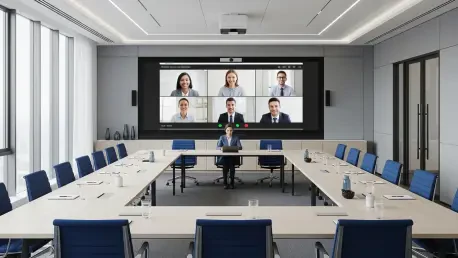
The traditional “bowling alley” layout is perhaps the greatest enemy of a productive hybrid meeting because it naturally creates a hierarchy based on proximity to the camera. In these millions of rooms currently in operation, the person sitting at the far end of the table is often reduced to a tiny, unrecognizable figure, making it impossible for remote participants to read their facial expressions or pick up on non-verbal cues. AI-driven intelligent directing solves this by using computer vision to identify every person in the room, regardless of their distance from the lens, and “cropping” them into their own individual gallery squares. This action effectively deconstructs the long, wide-angle shot and reconstructs it as a series of equal-sized portraits on the remote user’s screen. By putting every participant on an equal visual footing, we remove the “distance bias” and ensure that a whisper or a nod from the back of the room carries the same weight as a comment from the front.
Background noise from hallways and adjacent offices can easily derail a professional meeting. How do beamforming microphone arrays and AI-based acoustic fencing create virtual perimeters to filter out distractions, and what step-by-step measures should IT leaders take when deploying these in rooms without professional soundproofing?
Audio is the true heartbeat of any meeting, and while video captures the attention, poor sound quality is what ultimately leads to meeting fatigue. We are moving away from the old center-table speakerphones toward beamforming microphone arrays, which use sophisticated algorithms to physically point their pick-up pattern toward the person currently speaking. This is often paired with AI-based acoustic fencing, which essentially draws a digital line around the meeting area; any sound originating outside that virtual perimeter, such as a vacuum in the hallway or a loud conversation in a neighboring office, is simply ignored and filtered out. For IT leaders working in spaces without professional soundproofing, the first step is to conduct an acoustic audit to identify the specific sources of ambient noise. Then, they should configure the pick-up zones to tightly follow the seating arrangement, ensuring that the technology “shields” the conversation from the environmental chaos of a busy office.
Huddle spaces are now utilizing all-in-one video bars and dual displays to mirror the boardroom experience. Why is it important to dedicate one screen entirely to a people gallery, and can you share an anecdote where this setup prevented remote workers from being sidelined during fast-paced sessions?
In the modern office, the huddle space has become the primary engine of innovation, and equipping these rooms with all-in-one video bars ensures a consistent and high-quality experience for every team. I am a firm believer that dual displays should be the standard requirement because they allow you to dedicate one full screen to shared content and the other exclusively to the people gallery. This setup creates a “permanent physical presence” for remote participants, ensuring they aren’t just a tiny thumbnail hidden under a PowerPoint slide. I remember a particularly intense product sprint where the local team was huddled around a digital whiteboard, moving at a frantic pace. Because the remote experts were displayed life-sized on their own dedicated screen, the team in the room was constantly reminded of their presence, leading them to pause and ask for input whenever they saw a remote colleague lean forward or look puzzled. Without that dedicated screen, those remote voices would have almost certainly been sidelined in the heat of the moment.
Shifting from rectangular tables to D-shaped or V-shaped furniture is a growing trend for improving camera sightlines. How do these alternative layouts complement AI framing software, and what are the practical trade-offs when trying to modernize a physical space without a total demolition?
The rectangular table was designed for a world where everyone was in the same room, but D-shaped or V-shaped furniture is designed for the camera. When the flat edge of a D-shaped table is placed against the wall where the display and camera are mounted, every participant is naturally angled toward the lens, which makes it much easier for AI framing software to identify faces and create a clean gallery view. This physical orientation eliminates the “tennis match” effect, where people are constantly turning their heads back and forth between their colleagues and the screen. The practical trade-off is that these shapes often accommodate fewer people than a traditional long table, meaning you might sacrifice a seat or two to gain a massive boost in meeting equity. However, for many organizations, this is a much more cost-effective way to modernize a room than a total architectural demolition, as it leverages the existing footprint while maximizing the effectiveness of the AI-driven cameras.
Organizations often struggle with platform interoperability when joining meetings on competing services. How do one-touch join systems and BYOD laptop connections simplify this process, and what metrics should companies track to ensure their room technology is actually fading into the background for the average user?
The most advanced room in the world is a failure if the participants are frustrated before the meeting even starts, which is why one-touch join systems are so critical. These systems allow a user to walk in and start a session with a single tap, and with the rise of direct guest join, a room configured for Microsoft Teams can now seamlessly host a Zoom or Webex call without the user needing to change any settings. For even greater flexibility, many companies are adopting a Bring Your Own Device (BYOD) approach, where a user’s laptop powers the professional-grade camera and audio system of the room. To measure success, companies should track “time to start” and the number of IT support tickets generated per room. If the technology is truly fading into the background, we should see people connecting in under 60 seconds without ever needing to call for technical assistance, proving that the tools are facilitating the conversation rather than distracting from it.
What is your forecast for the future of the intelligent workspace?
I believe we are rapidly approaching an era where the concept of a “remote” participant will feel entirely archaic because the technology will make location irrelevant. My forecast is that the intelligent workspace will move beyond simple framing and noise cancellation toward “contextual intelligence,” where the room itself understands the sentiment and flow of a meeting to provide real-time summaries or even suggest data visualizations based on the conversation. We will see the integration of spatial audio and higher-fidelity visuals that make it feel like we are sharing the same air, even if we are thousands of miles apart. Ultimately, the success of these spaces will be defined by their invisibility; the tech will be so well-integrated that we won’t think about cameras or microphones at all, and our only focus will be the human connection and the work at hand.