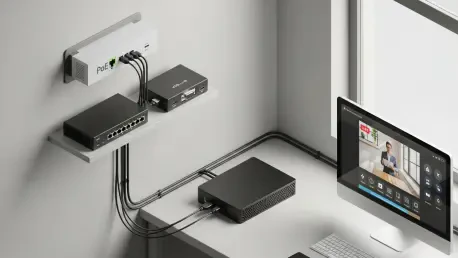

Remote workstations fail at the worst moments and field robots freeze just off-grid, yet troubleshooting often still begins with a frantic hunt for a spare monitor, a USB keyboard, and a long HDMI cable when what teams truly need is a way to see and steer a misbehaving machine before its operating system even boots, and LeafKVM enters that gap with a $119, open KVM-over-IP box that promises BIOS-level control, driver-free input emulation, and sub-100 ms video latency in a compact, passively cooled metal enclosure designed for reliability rather than spectacle. By presenting itself as a standard keyboard, mouse, and storage device to the target system, the unit makes recovery actions—resetting a broken bootloader, toggling a UEFI setting, feeding an installer image—possible from anywhere, sidestepping the usual cascade of truck rolls and improvised dongles. The proposition is simple: cut response time, cut costs, and reduce human error.
The Case for Open KVM-over-IP
The value of KVM-over-IP has been clear in data centers for years, but affordable, open options for labs, homelabs, and edge deployments remained elusive. LeafKVM positioned itself as a practical bridge: an out-of-band controller that works whether a PC is at a login screen, stuck in firmware setup, or entirely offline after a kernel panic. This matters beyond IT desks. A robotics team testing a Jetson carrier or a developer provisioning a headless mini‑PC can now attach a single box and regain full control without expecting the target OS to load agents or drivers. Moreover, the device moonlights as a low-latency HDMI relay for remote video preview, handy for studio switchers, kiosk signage, or QA stations where fast, accurate picture feedback helps catch issues early. The emphasis fell on versatility without vendor lock-in.
LeafKVM leaned on openness as both a trust signal and a path to sustainability. The creators committed to releasing firmware source, repeatable build recipes, and full hardware schematics on GitHub before units shipped, an uncommon pledge in this category. That decision enabled audits of the Rust-based backend handling video, networking, and USB HID emulation, and it allowed contributors to propose patches for corner cases, like fussy UEFI consoles or rare keyboard scan codes. On the usability front, the project shipped an OTA update mechanism and a web dashboard derived from a GPL‑2.0 JetKVM fork, plus a 2.4‑inch capacitive touchscreen to handle first-boot setup, Wi‑Fi credentials, HDMI preview, and health checks without borrowing another computer. Security got equal billing through built‑in Tailscale support, letting teams reach devices across NAT with least-privilege ACLs.
Specs, Software, and What Comes Next
Under the hood, the unit used a Rockchip RV1126B with four Cortex‑A53 cores, paired with 512 MB of DDR3 and microSD storage. HDMI input entered through a Lontium LT6911C CSI bridge, topping out at 4K at 30 fps or 1080p at 90 fps, which balanced throughput and heat. I/O was practical: HDMI in, two USB‑C ports, one USB‑A, dual‑band Wi‑Fi 5, Bluetooth, and 100 Mbps Ethernet with 802.3af PoE. Power came from USB‑C at 5 V/1 A or via PoE, allowing flexible rack, cart, or wall deployments. The CNC‑milled aluminum case doubled as a passive heatsink, a nod to reliability in closets and vehicles where fans clog or fail. On the software side, a Buildroot 2026.02 LTS base kept the image lean and reproducible, while Slint powered the on-device touchscreen UI. Because the device enumerated as standard USB HID and mass storage, compatibility extended to Windows, macOS, Linux, BSD, and firmware screens without drivers.
Performance claims targeted responsiveness rather than headline bandwidth. The project advertised capture and streaming latency under 100 ms, which is meaningful when toggling BIOS flags, entering complex passwords, or selecting boot media under pressure. That focus aligned with incident response needs: if a server in a branch office stalled on a BitLocker prompt after an unexpected reboot, a technician could type the recovery key remotely, mount a repair ISO through emulated storage, and continue, no courier required. This approach naturally led to measured trade-offs. A 100 Mbps Ethernet PHY constrained maximum uplink, but improved thermals and PoE simplicity. The RV1126B choice prioritized stable codecs and mature kernels over novelty SOCs. For many operators, that balance—predictable HDMI capture, dependable HID emulation, and VPN-integrated access—mattered more than chasing 4K60 at any cost.
Funding, Availability, and Practical Takeaways
LeafKVM entered crowdfunding at $119 with free U.S. shipping and a $12 international rate, aiming for a $10,000 goal. At the time of writing, the campaign sat at 82% with more than 40 days left, and estimated shipments were slated for mid‑January 2027 if funding closed successfully. That timeline reflected the realities of small-batch manufacturing: sourcing the LT6911C, booking CNC time, and validating OTA updates all introduce friction that glossy spec sheets rarely admit. Still, the logistics plan looked concrete. PoE support lowered accessories buyers needed to source, and publishing hardware files before shipping created a backstop for long-term maintenance. For labs standardizing on self-hosted infrastructure, the proposition was not just cost; it was control over the entire stack, from bootloader to browser UI.
The implications for daily operations had been straightforward and actionable. Teams planning rollouts could start by mapping where out-of-band control delivered immediate wins: field kiosks, school IT carts, NUC-based signage, and robotics benches. Network engineers would segment LeafKVM units, enable Tailscale with device-level keys, and restrict dashboard access through SSO or mTLS. Firmware maintainers could schedule quarterly OTA windows, pinning Buildroot updates to that cadence and testing HID edge cases in a golden image lab. Finally, buyers assessing alternatives should weigh three criteridriverless BIOS reach, published source and schematics, and thermals under continuous capture. Prioritizing those checks favored tools that sustained uptime, reduced hands-on recovery, and kept ownership in the operator’s hands rather than a vendor portal.