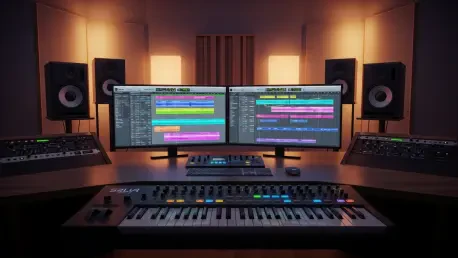

Digital audio workstations serve as the foundational architecture for modern recording environments, where the delicate balance between complex feature sets and software stability determines the success of a professional studio session. As engineers and producers increasingly rely on open-source solutions for high-fidelity audio engineering, the demand for frequent, surgical updates becomes paramount. The arrival of version 9.2 represents a strategic response to these demands, functioning as a critical maintenance release that addresses the inevitable growing pains following major architectural shifts. This specific update is not merely about adding bells and whistles; it is about fortifying the core infrastructure of the DAW to ensure that the creative process remains uninterrupted by technical friction. By targeting specific inconsistencies in the user interface and expanding the depth of MIDI integration, the development team has provided a more reliable platform that rivals proprietary alternatives in both performance and precision during the 2026 production cycle.
System Stability: Refining the User Interface
Rectifying Navigation and Pane Interaction Errors
A significant focus of this update involved resolving the erratic behavior of the editor’s bottom pane, which had become a point of contention for users following the broad changes in the version 9.0 rollout. Previously, late-stage development adjustments caused the interface to lose focus or respond incorrectly when users attempted to toggle selections between various regions, tracks, and internal editor elements. This instability often led to accidental track adjustments or visual misalignment that slowed down the mixing process. The 9.2 update restores the intended logic of the interface, ensuring that the bottom pane remains contextually aware and responsive to every mouse click or keyboard command. This restoration of stability allows engineers to move fluidly through dense project files without the fear of the software misinterpreting their intent. By fixing these interactive glitches, the software regains the professional polish required for time-sensitive environments where every second counts during a live recording.
Furthermore, the development team successfully finalized the stabilization of ruler visibility, a task that began with preliminary corrections in earlier minor releases but has now reached full optimization. In previous iterations, the rulers used for timing and project markers would occasionally flicker or fail to align with the playhead during rapid zooming or scrolling maneuvers. This update ensures that the visual timeline remains perfectly synced with the underlying audio data, regardless of how complex the session structure becomes. For professionals managing hundreds of tracks, having a reliable visual reference is essential for precision editing and synchronization. The elimination of these visual bugs represents a commitment to the user experience that transcends simple feature additions. It creates a cohesive environment where the tools stay out of the way of the artist, providing a transparent window into the audio data that is being manipulated. Consequently, the workspace feels more grounded and predictable for long-term project management.
Optimizing Visual Feedback for Complex Arrangements
Beyond the immediate fixes to the editor pane, the update introduces subtle but effective improvements to how the DAW communicates session information to the operator. One of the more refined adjustments involves the “zoom-to-session” behavior, which has been recalibrated specifically for new or empty sessions to prevent jarring visual jumps. In the past, opening a fresh project could result in an inconsistent zoom level that didn’t provide a helpful starting point for recording. Now, the software defaults to a logical, bird’s-eye view that adapts to the user’s monitor resolution immediately. This attention to detail extends to the way MIDI cue recording is handled, particularly concerning note velocity. The system now accurately preserves the velocity values for notes that are held down before a recording pass begins. This ensures that the emotional intent of a performance is captured accurately from the very first beat, rather than suffering from the truncated or flattened MIDI data that often plagues lesser workstations.
This level of technical precision is also reflected in the updated display of MIDI CC lanes and pitchbend information, which are critical for electronic music production. Pitchbend values are now presented in a standardized range from -8192 to 8191, providing a clear and mathematically accurate representation of the data being sent to virtual instruments. By moving away from obscure or proprietary labeling and adopting industry-standard numerical ranges, the software becomes more intuitive for those who regularly dive into deep automation lanes. Additionally, the MIDI CC lanes now display both the specific channel and the controller information simultaneously. This dual-layered feedback mechanism simplifies the management of complex automation, making it easier to track which parameters are being influenced across a multi-timbral setup. These refinements collectively contribute to a more professional atmosphere where the data is presented clearly and the interface remains robust under heavy graphical loads.
Workflow Integration: MIDI and Asset Management
Intelligent MIDI Note Chasing and Composition Tools
The introduction of MIDI note chasing marks a major milestone for users who work with long, sustained textures like atmospheric pads, orchestral drones, or cinematic soundscapes. In older versions, starting playback in the middle of a long-held MIDI note would result in silence until the next note-on message was received, which was a significant hurdle during the arrangement phase. The 9.2 update implements a sophisticated chasing algorithm that scans the timeline behind the playhead and triggers the appropriate notes instantly. This feature can be managed globally through the preferences menu or toggled on a per-track basis, offering flexibility for different musical contexts. While the current implementation does not yet extend to mid-note loop starts, its presence during standard linear playback significantly improves the efficiency of reviewing complex arrangements. It allows composers to jump to any point in their project and hear the full harmonic context without having to restart from the beginning of a phrase.
Complementing the note chasing feature is the new fast note duplication shortcut, which utilizes the Ctrl or Cmd plus D key combination to streamline the melodic layering process. When a user selects a group of MIDI notes and hits the shortcut, the software immediately generates a duplicate and aligns it with the active grid settings, assuming snapping is enabled. This eliminates the tedious process of manual copying and pasting, allowing for the rapid creation of rhythmic patterns or chord extensions. A particularly useful aspect of this implementation is that the newly duplicated notes remain selected, enabling the user to immediately transpose them using the arrow keys. This creates a highly tactile and responsive workflow for experimenting with different voicings or percussive variations. By integrating these high-level composition tools, the workstation bridges the gap between a traditional multi-track recorder and a modern creative instrument, catering to the needs of both old-school engineers and contemporary digital composers.
Technical Precision: Drag-and-Drop and Data Visualization
Asset management has received a notable boost with the expansion of drag-and-drop capabilities, particularly concerning how the software handles multiple audio regions from the sources list. Producers can now grab several files at once and pull them directly into the editor, where they are automatically organized across tracks or placed sequentially. This is a massive time-saver when importing stem files for a remix or bringing in a collection of field recordings for sound design. Furthermore, the update introduces a clever shortcut for merging mono files into stereo pairs. By dragging one mono audio region directly onto another within the editor, the software understands the intent to create a unified stereo track. This intuitive gesture replaces what used to be a multi-step menu process, allowing for a more organic interaction with the audio assets. Such improvements demonstrate a deep understanding of how professionals actually interact with their software during the heat of a creative session.
On the technical side, the update ensures that internal data management remains consistent with professional standards across different operating systems. As a cross-platform solution, the software must handle file paths, plugin states, and hardware communication with absolute reliability. The 9.2 release refined these under-the-hood processes, ensuring that session files remain portable and stable whether they are opened on a Linux-based studio machine or a portable laptop setup. The improvements to MIDI data handling, such as the preservation of velocity during cue recording, highlight a commitment to data integrity that is often overlooked in favor of flashier features. By focusing on how data is recorded, displayed, and moved across the interface, the developers have created a ecosystem that feels more cohesive. This technical foundation is what allows the higher-level creative tools to function without being undermined by background errors, resulting in a workstation that feels both powerful and dependable for the modern professional.
Future Considerations for Open-Source Production
The deployment of version 9.2 successfully bridged the gap between rapid feature expansion and the necessity for industrial-grade stability. By addressing the critical interface glitches that appeared after the 9.0 launch, the development cycle demonstrated a high level of responsiveness to the professional user base. The integration of advanced MIDI note chasing and the streamlined duplication shortcuts provided immediate benefits to composers, while the refinements in asset management simplified the logistical burden of large-scale projects. These changes were not merely superficial; they represented a deep dive into the software’s architecture to ensure that the user’s intent was always accurately reflected in the digital domain. The move toward standardized data visualization for pitchbend and CC lanes further solidified the platform’s position as a serious contender for professional studio environments.
Moving forward, professionals should consider integrating these new workflow shortcuts into their daily routines to maximize the efficiency gains offered by the update. The ability to merge mono tracks through simple drag-and-drop actions and the new MIDI duplication logic can significantly reduce the time spent on repetitive tasks. Studios looking to migrate toward open-source solutions found a more compelling argument in this release, as the focus on stability and industry-standard precision addressed common concerns regarding software reliability. It remains essential for users to explore the per-track settings for MIDI note chasing to tailor the behavior to their specific hardware and virtual instrument setups. By adopting these updated tools, engineers ensured that their technical environment remained a robust partner in the creative process, rather than a hurdle to be overcome. The progress made in this version set a clear trajectory for continued refinement in the evolving landscape of digital audio production.